> ## Documentation Index
> Fetch the complete documentation index at: https://docs.choosefloat.com/llms.txt
> Use this file to discover all available pages before exploring further.
# Product page widget
> Drop-in instalment messaging and a "How it works" explainer for product and cart pages - no API calls required.
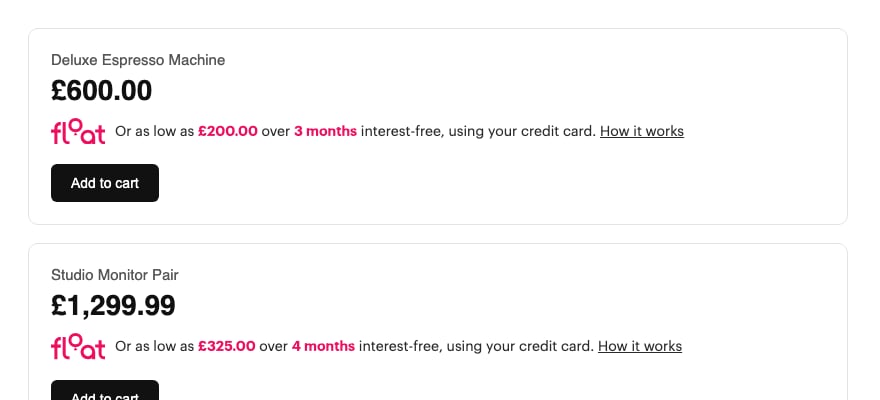
The product page widget renders instalment messaging next to the price (e.g. "or as low as £200.00 over 3 months interest-free"), along with a built-in "How it works" explainer modal, all from a single script tag with no API call or signature required.
If your store runs WooCommerce, Shopify, or Magento with the [official Float plugin](/guides/plugins), instalment messaging is already included, so you don't need to add it yourself. This page is for [custom API integrations](/guides/accepting-payments).
The UK widget bundle is rolling out. Until the UK host is live, render instalment messaging yourself from your [merchant config](/api-reference/get-config) and link the explainer page as described in [Accepting payments](/guides/accepting-payments). Talk to your Float contact if you want to be an early adopter.
## Add the widget
Place a script tag wherever the messaging should render, typically directly below the price:
```html theme={null}
```
The script injects its own markup (logo, instalment breakdown, and a "How it works" link) at its own position in the DOM. There's no container element or JS SDK to set up.
 ## Parameters
| Param | Required | Description |
| ------------- | -------- | ------------------------------------------------------------------------------------------------------------------------------------------------------- |
| `price` | Yes | The product's current selling price in Pounds, as a plain number (e.g. `600` for £600.00, not pence). Use the final, post-discount, tax-included price. |
| `instalments` | No | Number of interest-free monthly instalments to advertise (e.g. `3`). Defaults to `3`. The American spelling `installments` is also accepted. |
## Keep the price in sync
If the price can change without a page reload (a variant picker, a quantity stepper, a discount code), call `floatUpdate` on the rendered element:
```js theme={null}
document.querySelector('.float-w').floatUpdate(750); // new price
document.querySelector('.float-w').floatUpdate(750, 4); // new price and term
```
With several widgets on the page, scope the lookup to the product you're updating:
```js theme={null}
card.querySelector('.float-w').floatUpdate(newPrice);
```
Re-inserting a fresh `
## Parameters
| Param | Required | Description |
| ------------- | -------- | ------------------------------------------------------------------------------------------------------------------------------------------------------- |
| `price` | Yes | The product's current selling price in Pounds, as a plain number (e.g. `600` for £600.00, not pence). Use the final, post-discount, tax-included price. |
| `instalments` | No | Number of interest-free monthly instalments to advertise (e.g. `3`). Defaults to `3`. The American spelling `installments` is also accepted. |
## Keep the price in sync
If the price can change without a page reload (a variant picker, a quantity stepper, a discount code), call `floatUpdate` on the rendered element:
```js theme={null}
document.querySelector('.float-w').floatUpdate(750); // new price
document.querySelector('.float-w').floatUpdate(750, 4); // new price and term
```
With several widgets on the page, scope the lookup to the product you're updating:
```js theme={null}
card.querySelector('.float-w').floatUpdate(newPrice);
```
Re-inserting a fresh `